
CentralDispatch Carrier Hub
Cox Automotive, IncAuto & Vehicles
3.852.00 Reviews
- Version
- 51.0.0
- Installs
- 10.00K
- Age Rating
- Everyone
Screenshots
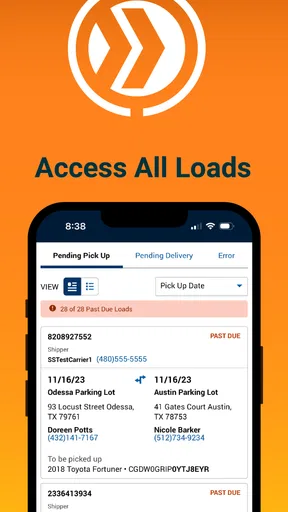
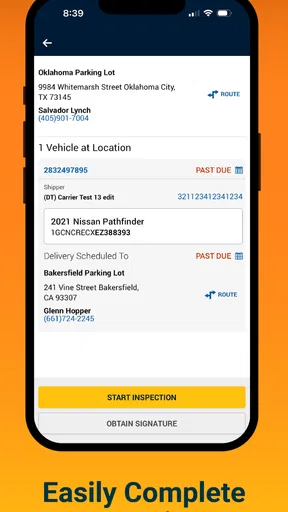
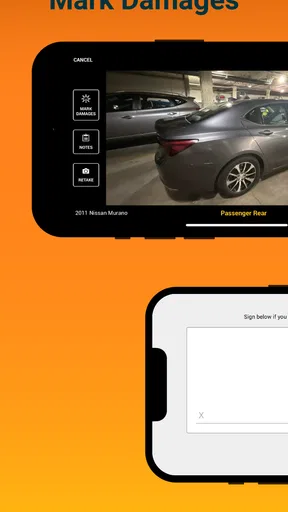
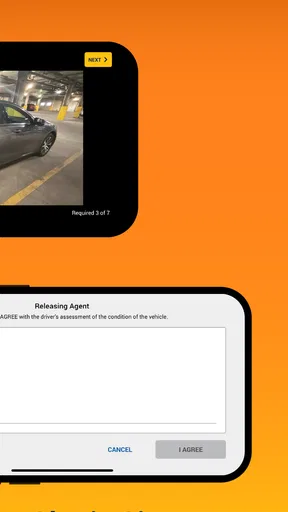
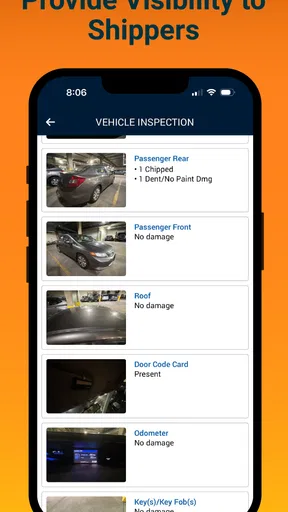
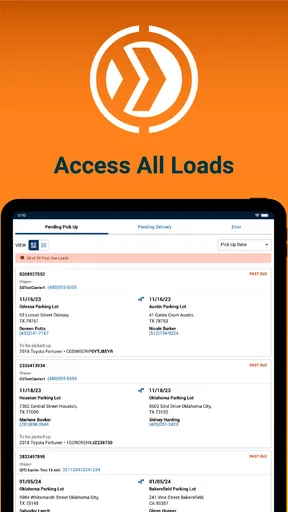
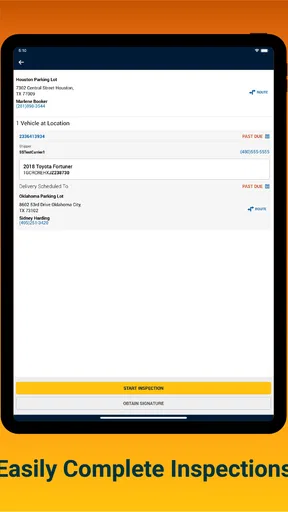
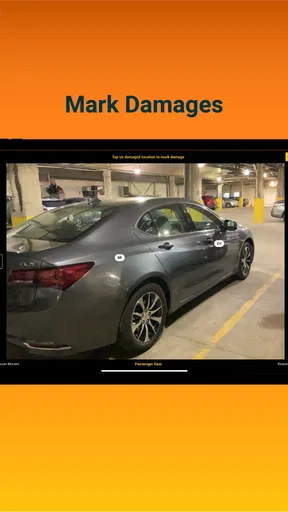
Our Review of CentralDispatch Carrier Hub
 Analysis by Appyee
I approached CentralDispatch Carrier Hub as a focused work tool rather than a general driving app. Its role is narrow but practical: it is an inspection tool for Central Dispatch, aimed at people who need to check vehicle-transport details while working in the carrier side of the auto-transport process. That focus is the main reason to consider it. It is not trying to replace navigation, vehicle shopping, maintenance tracking, or a broad fleet-management platform.
In my experience, the value of a tool like this comes from reducing the gap between what a carrier sees in the real world and what needs to be recorded in a dispatch workflow. A vehicle can look fine at a glance, yet small marks, condition details, or mismatches can become important later. A dedicated inspection workflow encourages a more deliberate check instead of relying on memory or scattered notes.
The app is free to use and is listed for Everyone, which makes it easier for a carrier operation to consider without adding a purchase decision for each worker. Cox Automotive, Inc. is the developer behind it. The current release is version 51.0.0, and it runs on Android eight and later, so users with older phones should check compatibility before planning to use it on the job.
Why the inspection capability matters
The central capability is not exciting in the way a consumer app might be, but it addresses a real source of friction in vehicle transport: documenting condition consistently. When a carrier collects or handles a vehicle, an inspection record can help create a shared reference for the people involved in the move. That is more useful than keeping a quick mental note or writing an informal description that another person may interpret differently.
What I like about the inspection focus is that it gives the work a defined stopping point. Instead of treating the vehicle check as an afterthought before departure, I would use the app as a prompt to slow down, examine the vehicle, and complete the relevant record while the vehicle is physically in front of me. That timing matters. Details are easier to verify at pickup than after the truck has left the location.
This also changes the role of the phone. With ordinary notes, the phone is just a blank page. With a purpose-built Central Dispatch tool, the phone becomes part of the carrier’s operating process. The benefit is not simply typing faster; it is keeping inspection work connected to the dispatch context rather than separating it into a notebook, a camera roll, and later data entry.
There is a useful trade-off here. A specialized inspection app can make a narrow task more orderly, but it is only valuable when the carrier or dispatcher already works within the Central Dispatch environment. Someone looking for a general vehicle-condition checklist will probably find the app too specific. Its strength comes from being tied to a particular professional workflow, not from offering a universal inspection system for every driver.
Turning a vehicle check into a repeatable routine
I would treat the app as part of a repeatable handoff routine. Before moving a vehicle, the carrier can open the inspection tool, compare what is physically present with the job information, and work through the condition check without depending on memory. The important habit is to complete the inspection at the point of contact, not postpone it until the end of a busy route.
That approach is especially useful when several vehicles are handled in one day. Repetition creates its own risk: after the third or fourth inspection, it is easy to confuse one vehicle’s details with another’s. A dedicated workflow helps separate each job mentally and operationally. I would still review the final record before leaving, because a structured screen does not automatically prevent a rushed or incomplete inspection.
Another practical insight is that inspection quality depends on the order in which the work is done. I would first identify the correct vehicle and job, then inspect the exterior and interior methodically, and only afterward finalize the record. Opening the app after the inspection may save a few seconds at the location, but it increases the chance of forgetting a detail or mixing vehicles. The app is most effective when used during the inspection rather than as a reporting tool afterward.
For a small carrier, this can also make training easier. A new driver may know how to handle a vehicle but still be inconsistent about documenting its condition. A dedicated inspection tool gives the operation a common place to perform that task. It does not replace training or judgment, but it can make the expected workflow easier to explain: inspect, record, review, and move on.
What using it in the field feels like
A realistic example would be a carrier arriving to collect a vehicle while the pickup location is busy. The driver has limited time, people are asking questions, and the next appointment is already in mind. In that situation, the temptation is to glance over the vehicle, remember the obvious marks, and deal with the paperwork later. I would instead use CentralDispatch Carrier Hub at the vehicle, because that is when the condition can be checked directly.
The practical advantage is not that the app makes the vehicle inspection magically faster. It may actually require the driver to pause and be more careful. That is a good kind of friction when it prevents a hurried inspection. A few extra moments spent confirming the correct vehicle and recording its condition can be more valuable than rushing away and trying to reconstruct the details from memory.
For best results, I would keep the phone ready but not let it distract from the vehicle itself. The screen should support the inspection, not become the inspection. Good lighting, a slow walk around the vehicle, and a final review remain important. The app can organize the record, but it cannot notice a scratch that the user never looks at or correct an entry made against the wrong job.
This is also where the app’s narrow purpose becomes clear. A consumer driver who wants reminders for oil changes or a simple log of fuel use will not gain much from it. A carrier who needs to connect a vehicle-condition check with dispatch work has a much stronger reason to install it. The same focused design that makes it useful for one audience makes it unnecessary for another.
The strongest everyday scenario
The best scenario is a carrier handling scheduled vehicle movements where inspection information needs to be captured as part of the job, especially when multiple people may rely on that record later. At pickup, the driver can use the inspection workflow before loading. At delivery, the condition can be checked again as part of the handoff process. The value is greatest when the record needs to support communication between the driver, dispatch staff, and the people receiving the vehicle.
I would be particularly inclined to use it when the vehicle is not in perfect condition at pickup. Existing damage, unusual wear, or a detail that could be misunderstood later deserves careful documentation. In such cases, the inspection is not just a routine box to tick; it is the moment when the carrier establishes what was visible before transport began.
There is a second useful scenario: a small operation where drivers have different habits. One person may prefer paper, another may use phone notes, and a third may take pictures without labeling them clearly. A shared inspection tool can reduce that variation. It gives the team a common process, although the operation still needs to agree on how thoroughly each inspection should be performed.
I would not describe it as a complete solution for every dispute or every transport record. A digital inspection entry is only as reliable as the accuracy of the person making it. The best result comes from combining careful physical checking with clear, timely documentation. If a carrier treats the app as a shortcut instead of a record-keeping aid, the benefit drops sharply.
Where the trade-offs appear
The first trade-off is specialization. CentralDispatch Carrier Hub makes sense for a Central Dispatch carrier workflow, but it is not a broad toolbox for vehicle owners. If I needed route planning, fuel tracking, maintenance schedules, expense management, or a general fleet dashboard, I would look elsewhere or use those tools alongside this one. Installing it will not turn a personal phone into a complete transport-management system.
The second trade-off is dependence on disciplined use. An inspection app can encourage consistency, but it cannot force a driver to inspect every area carefully. In a rushed pickup, the user may still skip details, select the wrong job, or finalize a record without checking it. I would build a short review step into company procedure rather than assuming the application itself guarantees accurate records.
There is also a practical device consideration. The app supports Android eight and later, which covers many working phones but not every older device still in service. A company equipping a mixed fleet should check the phones used by drivers before making the app central to its process. Compatibility is a small detail until a driver reaches a pickup with a device that cannot run the required tool.
The public response is modest rather than overwhelming: the app has an average rating of 3.8 from around one hundred fifty ratings, with just over fifty written reviews and more than ten thousand installs. I read that as a sign of a focused utility with a real but specialized audience, not as proof that it will suit every carrier. The rating is useful context, but the workflow fit matters more than the number for this kind of professional app.
Another trade-off is that a dedicated workflow may feel slower than informal notes at first. A driver who is used to typing one sentence into a notes app may prefer that immediate simplicity. My view is that the extra structure earns its place when the inspection needs to be repeatable and connected to dispatch work. For occasional personal vehicle checks, the simpler alternative may genuinely be better.
How it compares with ordinary alternatives
The usual alternatives are paper forms, phone notes, photographs stored in the gallery, messaging apps, or a larger fleet-management platform. Paper is dependable in places where phone use is inconvenient, but it can be hard to share, search, or connect to the right job later. Notes are quick, yet they depend heavily on the writer’s wording and organization. Photos can preserve visual evidence, but unlabeled images quickly become difficult to match to a particular vehicle.
CentralDispatch Carrier Hub has an advantage when the carrier wants inspection work to sit inside the dispatch process rather than beside it. That connection is the reason I would choose it over a blank notes app. The app is less appealing if the team has already invested in a larger system that handles inspections, dispatch records, and fleet administration together. In that case, adding another workflow could create duplication instead of clarity.
A spreadsheet can be flexible, but flexibility is not always helpful on a phone during a pickup. It may require more manual organization and more decisions from each driver. A specialized inspection tool can reduce that burden by keeping attention on the vehicle and the job. The cost of that simplicity is that the user has less freedom to adapt the process for unrelated tasks.
For a carrier already working with Central Dispatch, I see the app as a more natural fit than generic alternatives. For an independent driver who only needs to remember a vehicle’s condition for personal reference, a camera and a short note may be enough. The right choice depends less on technical ambition and more on whether the inspection must become part of a shared transport workflow.
Who will gain the most from it
The clearest audience is a vehicle carrier or transport worker who needs a practical inspection step connected to Central Dispatch activity. It can also suit small carrier teams that want drivers to follow a similar process instead of inventing their own documentation habits. Dispatch staff may benefit indirectly because more consistent inspection work can make conversations with drivers easier and reduce ambiguity around a vehicle’s condition.
I would recommend it most strongly to users who regularly handle vehicle pickups and deliveries, especially when the condition record matters to more than one person. The free price removes an obvious barrier to trying it, and the Everyone age classification makes it suitable for a broad working audience. Those advantages matter, but they do not change the need for a compatible Android device and a workflow that actually uses Central Dispatch.
I would skip it if I were a private car owner looking for maintenance reminders, a navigation app, a buying guide, or a general driving companion. I would also hesitate if my company already has a reliable inspection feature inside another transport platform. Running two separate systems for the same record can create more work and make it unclear which entry should be trusted.
One tip I would give a new user is to decide on an inspection habit before relying on the app: use it at the vehicle, verify the job identity, check the vehicle methodically, and review the entry before moving on. That simple sequence addresses the biggest real-world weakness of digital inspection tools, which is not usually the screen itself but hurried or mismatched input.
My final take on the focused design
CentralDispatch Carrier Hub is a specialized Android app with a sensible purpose for the right professional audience. I appreciate that its usefulness comes from concentrating on inspection work rather than pretending to be an all-in-one driving platform. When used at pickup and delivery, it can help turn a casual vehicle check into a more consistent part of the carrier’s routine.
My recommendation is conditional but positive: if Central Dispatch is already part of your transport work, this free tool is worth trying as an inspection companion. If you only want a general vehicle log, it is probably too narrow. The app’s real strength is not convenience in the abstract; it is the discipline of recording vehicle condition in the same working context as the dispatch task.
With its current version, broad Everyone content rating, and support for Android eight or newer, it is accessible to many users. Still, I would judge it by one question: will it help your team perform and document inspections more consistently than the method you use now? If the answer is yes, the focused design is an advantage. If the answer is no, a simpler note-taking method or an existing fleet platform may be the better choice.
Verdict
Strengths of CentralDispatch Carrier Hub
- Centralizes load details, pickup data, and delivery instructions in one place.
- Push notifications can help carriers react quickly to dispatch updates.
- Useful document and status tools reduce reliance on phone calls and paperwork.
- Designed for carrier workflows rather than general messaging or email.
- Can improve communication visibility between drivers and dispatch teams.
Limitations of CentralDispatch Carrier Hub
- Requires dependable mobile data or Wi-Fi for timely updates in transit.
- Some features may depend on the carrier’s dispatch system integration.
- Frequent notifications could become distracting during busy driving periods.
- The interface may feel less useful when a carrier has few active loads.
- Account access and setup generally require information provided by a dispatch company.
Other Releases by Cox Automotive, Inc
View All
Kelley Blue Book: We Know Cars
Auto & Vehicles4.7
Similar Picks in This Category
View All
Android Auto
Google LLC4.1

maxim — order a taxi & food
PT. SITO4.7

Штрафы ГИБДД: проверка с фото
Pays LLC – Штрафы ГИБДД4.7

Номерограм – проверка авто
Авто Ассист4.8

Дром Авто
Дром4.9

Frequently Asked Questions
What is CentralDispatch Carrier Hub used for?
CentralDispatch Carrier Hub is designed for vehicle transport carriers who need to manage loads and transportation assignments connected with the Central Dispatch marketplace. Depending on the account and available features, it can help carriers review shipment information, organize jobs, communicate with customers or dispatch contacts, and keep important load details accessible while working on the road.
Who can use CentralDispatch Carrier Hub?
The app is primarily intended for professional vehicle transport carriers, drivers, dispatchers, and transportation companies that already use Central Dispatch services. It may not be useful as a standalone tool for private vehicle owners or people simply looking for a carrier. You will generally need an eligible Central Dispatch account, valid login credentials, and appropriate permissions before you can access its carrier-focused functions.
What information should I have ready before signing in?
Before downloading and opening CentralDispatch Carrier Hub, make sure your Central Dispatch account is active and that you know the correct email address, username, and password associated with it. Your company may also need to configure carrier profiles, driver access, or account permissions. If login fails, the issue may be related to account status or administrator settings rather than the app itself.
Does CentralDispatch Carrier Hub require an internet connection?
Yes, the app is intended to work with an internet connection because carrier information, load details, messages, and account data may need to synchronize with Central Dispatch services. A stable Wi-Fi or mobile-data connection is recommended, especially when checking updated shipment information or communicating with dispatch contacts. Offline availability and the amount of cached information may vary by feature and app version.
Is CentralDispatch Carrier Hub suitable for managing an entire transport business?
CentralDispatch Carrier Hub can be useful for handling carrier-related tasks, but it should not automatically be considered a complete transportation-management system. Its usefulness depends on the tools enabled for your Central Dispatch account and the way your company operates. Larger fleets may still need separate software for accounting, route planning, maintenance, driver scheduling, document storage, compliance, and broader business administration.
